Posts

Showing posts with the label salesforce

Understand CPQ Data Model

Image
Core objects used in CPQ   Quote: The main proposal sent to the customer, linked to a sales deal (Opportunity). It holds all items, prices, and customer details. Quote Line: Each row in the quote, like “5 Laptops at 50,000 each”. Every product, quantity, and price is one quote line. Product: What you sell. It can be a simple item (one laptop) or part of a bundle (Laptop + Mouse + Warranty). Price Book: A price list, like “Standard Prices” or “Partner Prices”. Price Book Entry: Connects one product to one price list with its list price (e.g., Laptop in Standard Price Book at 50,000). Product Options: The individual choices inside a bundle, like adding a mouse or extra warranty to a laptop. Product Features: Groups of related options, like “Accessories” or “Support Plans”, to keep options organized. Configuration Attributes: Extra questions asked during setup, such as color, size, or memory, to fine-tune the product. Quote Line Group: A way to group lines on a quote, like “Hardwar...

Why you might need Salesforce CPQ

Image
What CPQ Does? CPQ software makes creating customer quotes fast and error-free, replacing old pencil-and-paper methods. Upfront CPQ setup takes effort, but pays off with button-click quotes generation like pricing 10 custom chairs perfectly in seconds. Benifits of having CPQ CPQ software boosts sales by automating quotes, cutting errors, and speeding up deals. Fast, accurate quotes: Guides reps through configs, options, and discounts in minutes, with auto-approvals to skip long waits. Error reduction: Handles complex math, currencies, subscriptions, and custom pricing rules flawlessly. Consistency: Locks in pricing and discounts to avoid mistakes in deals. Revenue growth: Speed up the sales cycle, enables analytics for trends, and replicates deals easily for repeat customers. CPQ software benefits all sales players by simplifying workflows and boosting outcomes. Customer Gains Clear visuals and instant pricing help buyers grasp orders and stick to budgets easily. Company Advantages Cut...

Salesforce CPQ or Revenue Cloud Basics

Image
Salesforce is like a super organizer for businesses to track customers and sales. It keeps all info, contacts, deals, emails in one spot so teams collaborate easily. Salesforce CPQ (also known as Revenue Cloud) simplifies quoting for sales teams handling complex products. It breaks down into three steps: Configure products, Price them accurately, and Quote professionally. Sales reps spend only 27% of time selling; most is wasted on quotes and approvals. Salesforce CPQ helps sales teams handle tricky products without mistakes. Configure Pick products and add features customers want, like bundles or extras. Rules guide you to smart choices, like suggesting add-ons. Price The system auto-calculates costs with discounts, deals, or currency changes. No math errors or forgetting rules. Quote Create a sharp, branded document ready to email. Everything’s accurate, speeding up sales and happy customers. Salesforce CPQ shines for businesses with lots of products or tricky prices, like custom l...

Understanding Purchase Orders: Process, Types, and Real-Life Examples

Image
What is Purchase Order? A Purchase Order (PO) is a formal, legally binding document issued by the buyer to the seller , indicating the intention to purchase specific goods or services under agreed terms. It includes: Product/service details Quantities Prices Delivery date Payment terms Steps: 1. Requirement Identified The buyer identifies the need for certain goods/services. 2. Buyer Prepares a Purchase Order The buyer fills out a PO with: Items needed Quantities Prices (usually based on a prior Quote ) Shipping info Terms and conditions 3. Buyer Signs and Sends the PO to Seller The PO is signed (physically or digitally). It's sent via email, EDI (electronic data interchange), or procurement platform (e.g., SAP Ariba, Coupa). 4. Seller Reviews the PO The seller verifies the PO details. If everything looks good, the seller accepts the PO. NOTE: In many cases, the seller doesn’t need to physically sign — an email confirmation or acceptance in a system is sufficient. 5. PO Become...

Understanding the Salesforce Approval Process: A Step-by-Step Guide

Image
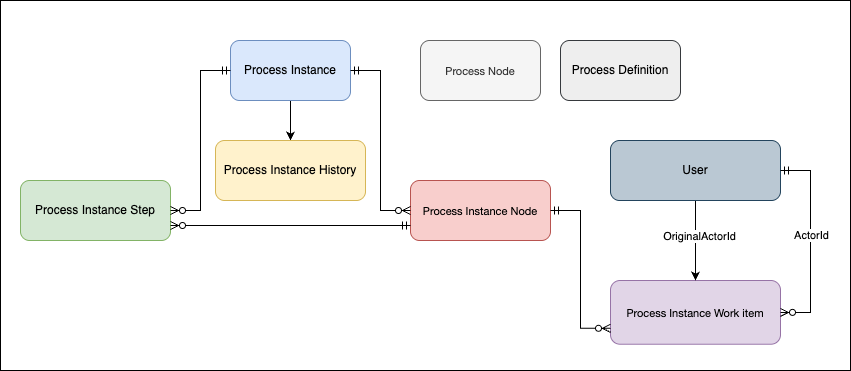
The Approval Process in Salesforce is an automated sequence of steps where a record is reviewed and approved (or rejected) by designated users based on predefined conditions. This ensures compliance, proper authorization, and consistency in business operations. Key Objects of an Approval Process 1. ProcessNode (Approval Step Definition) (04b) Defines the approval steps in a process. SELECT Id, Name, DeveloperName, ProcessDefinitionId, Description FROM ProcessNode 2. ProcessInstance (Approval Request) (04g) Created when a record is submitted for approval. Stores the current status and progress of the approval process for that record. Acts like a snapshot, tracking where the approval stands at any given moment. SELECT Id, ProcessDefinitionId, TargetObjectId, Status, CompletedDate, LastActorId FROM ProcessInstance 3. ProcessInstanceHistory  Keeps a record of all actions (audit trails) taken on a specific approval process instance. Logs approvals, rejections, reassignments, and recall...

Headless action button using LWC (No Modals)

Image
  A headless quick action executes custom code in a Lightning web component. Unlike a screen action, a headless action doesn’t open a modal window. Expose invoke() as a public method for headless quick actions; the invoke() method executes every time the quick action is triggered. Return type of invoke() is void . Using async will make invoke()  execute asynchronously.  // js file import { LightningElement, api } from 'lwc'; import { ShowToastEvent } from 'lightning/platformShowToastEvent'; export default class DispatchEventHeadlessAction extends LightningElement {     @api recordId;      isExecuting = false;     @api async invoke() {           if (this.isExecuting) {           // This code uses a boolean flag to block a double execution            return;          }           this.isExecuting ...