Posts

Showing posts with the label apex

RESTful API in Salesforce: The Complete Guide

Image
Think of a REST API as the digital waiter in a restaurant. You, the Client don't just walk into the kitchen and grab what you want; instead, you place a formal HTTP Request through a standardized menu. This request tells the Server exactly what you need using a specific Endpoint and an HTTP Method  like GET, POST or DELETE . Make API Callout In Salesforce public static void callAPI() { // Define the URL before using it String url = 'https://www.themealdb.com/api/json/v1/1/search.php?s=pizza'; // Instantiate a new Http object Http h = new Http(); // Instantiate a new HTTP request, specify the method (GET) as well as the endpoint HttpRequest req = new HttpRequest(); req.setEndpoint(url); // Set the URL endpoint req.setMethod('GET'); // Set the HTTP method // Set headers correctly using separate setHeader calls // req.setHeader('X-Key', 'Your API-Key'); // Send the request and get res...
Understanding the Salesforce Approval Process: A Step-by-Step Guide

Image
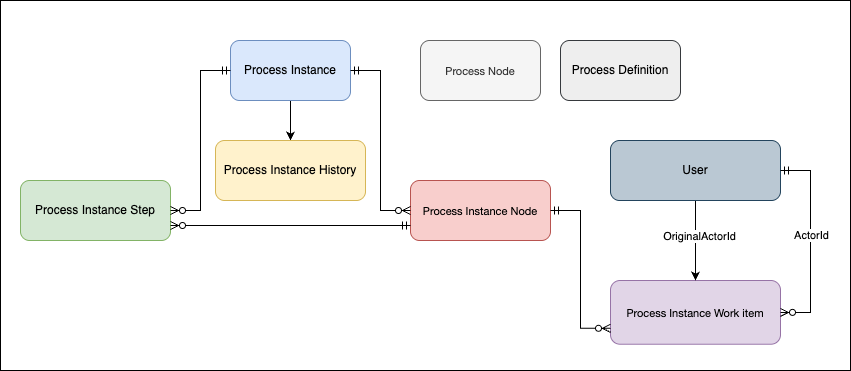
The Approval Process in Salesforce is an automated sequence of steps where a record is reviewed and approved (or rejected) by designated users based on predefined conditions. This ensures compliance, proper authorization, and consistency in business operations. Key Objects of an Approval Process 1. ProcessNode (Approval Step Definition) (04b) Defines the approval steps in a process. SELECT Id, Name, DeveloperName, ProcessDefinitionId, Description FROM ProcessNode 2. ProcessInstance (Approval Request) (04g) Created when a record is submitted for approval. Stores the current status and progress of the approval process for that record. Acts like a snapshot, tracking where the approval stands at any given moment. SELECT Id, ProcessDefinitionId, TargetObjectId, Status, CompletedDate, LastActorId FROM ProcessInstance 3. ProcessInstanceHistory  Keeps a record of all actions (audit trails) taken on a specific approval process instance. Logs approvals, rejections, reassignments, and recall...

Visual Force Email Templates being sent as blank by Automated Process User

This might happen if an automated process user updates a record and then uses the same record to send an email using the Visual Force email template. Example of email template: Hi, XYZ has submitted {!relatedTo.Name} for your re-approval. The following title of a known issues article in Salesforce is: VF Workflow Emails are Blank when the records are Last Modified by "Automated Process" user Solution: To replace/override the automated process user by any user who has required permissions. step 1: Login to workbench step 2: Use below POST endpoint /services/data/v58.0/tooling/sobjects/PlatformEventSubscriberConfig step 3: JSON body should appear below: {     "BatchSize" : "50",     "DeveloperName" : "",     "MasterLabel" : "",     "PlatformEventConsumerId" : "01qXXXXXX..", // APEX Trigger's ID     "UserId" : "005XXXX..." // User's ID } step 4: Hit Execute, that will ove...

How to Give Permissions to Automated Process Users or System Context Users

Image
What is Automated Process Users Automated Process Users are special users created automatically by Salesforce, are essential to the execution of automated jobs and background processes. These users are essential for executing tasks that require no direct human intervention, such as: Flows: Automated Process Users can run Flow automations that perform actions like updating records, sending emails, or creating tasks. Approval Processes: They can act on behalf of users in approval processes, ensuring that approvals move forward even without direct user interaction. Scheduled Jobs: These users can run scheduled jobs that perform maintenance tasks or batch data processing. 1. How to fetch automated process user using SOQL? SELECT ProfileId, name FROM User WHERE Alias = 'autoproc' 2. How to give permission of apex class to automated process user step 1: visit following link <ORG_BASE_URL>/_ui/system/user/ProfileApexClassPermissionEdit/e?profile_id=<Automated_Process_User...

Salesforce Custom Metadata Types Explained: Benefits, Setup, and Examples

Image
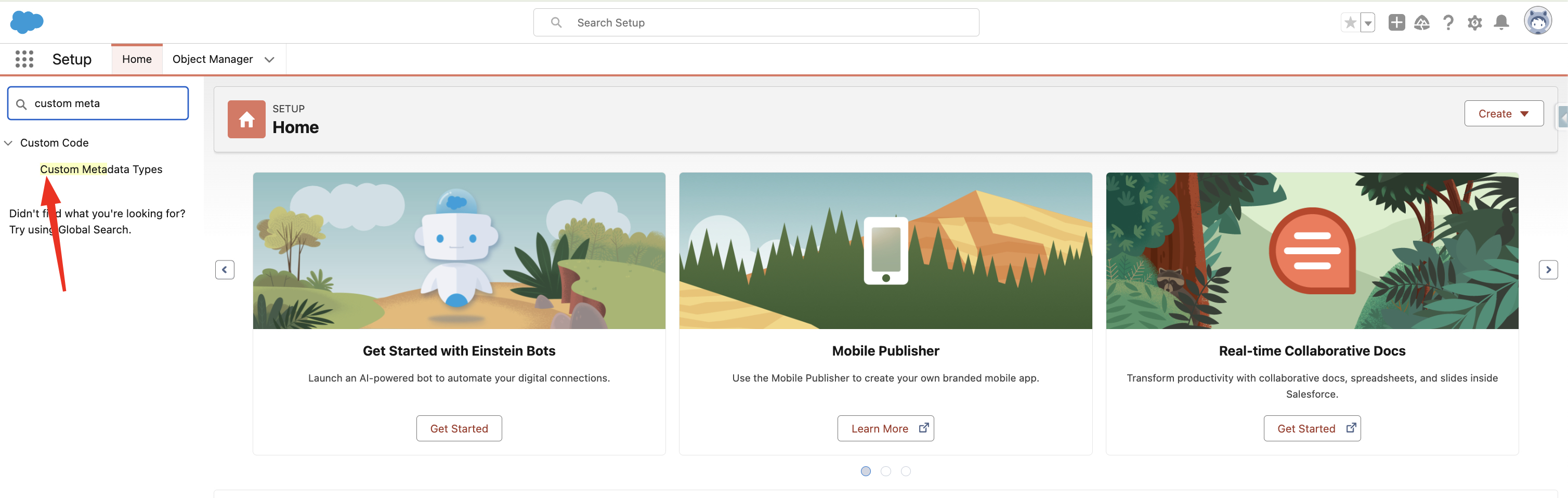
Salesforce's powerful Custom Metadata Types functionality lets developers and administrators make deployable, adjustable configurations and settings. The application cache contains all of the custom metadata, allowing access without requiring repeated database queries. How to create Custom Metadata Type 1. Search  Custom Metadata Type  in Setup Quick Find. 2. Click New Custom Metadata Type 3. Fill all required fields and click save Accessing Custom Metadata Type in Apex 1. Using getAll() - returns map of developer name to metadata type record list.   Datatype returned by the method - Map<String, Games__mdt> List<Games__mdt> mcs = Games__mdt.getAll().values(); boolean textField = null; if (mcs[0].GameType__c == 'PC') { textField = true; } system.assertEquals(textField, true); 2. Using getInstance(recordId) Returns a single custom metadata type record sObject for a specified record ID. Games__mdt mc = Games__mdt.getInstance('m00000000000001'); Using g...

Salesforce GraphQL: Developer Insights

Image
What is GraphQL?   GraphQL is a standard query language for APIs and a runtime for fulfilling those queries with your data. It provides users with a single endpoint to request all necessary data from in a single request. Applications that utilise GraphQL APIs are frequently far more efficient than those that stick with REST APIs. This is due to their capacity to retrieve all required data in a single invocation, which reduces the number of round trips to the server, allowing you to customise it to meet your needs. Why GraphQL is better than REST API? REST API is the gold standard for APIs, yet traditional REST APIs present significant issues when developing modern, highly performant, and scalable online and mobile applications. REST endpoints do not allow client changes to the API endpoint's response.   For example, when fetching a user's phone number from a REST API, receiving extraneous data beyond the number adds unnecessary costs for both the server and the requester. ...