What is Automated Process Users Automated Process Users are special users created automatically by Salesforce, are essential to the execution of automated jobs and background processes. These users are essential for executing tasks that require no direct human intervention, such as: Flows: Automated Process Users can run Flow automations that perform actions like updating records, sending emails, or creating tasks. Approval Processes: They can act on behalf of users in approval processes, ensuring that approvals move forward even without direct user interaction. Scheduled Jobs: These users can run scheduled jobs that perform maintenance tasks or batch data processing. 1. How to fetch automated process user using SOQL? SELECT ProfileId, name FROM User WHERE Alias = 'autoproc' 2. How to give permission of apex class to automated process user step 1: visit following link <ORG_BASE_URL>/_ui/system/user/ProfileApexClassPermissionEdit/e?profile_id=<Automated_Process_User...
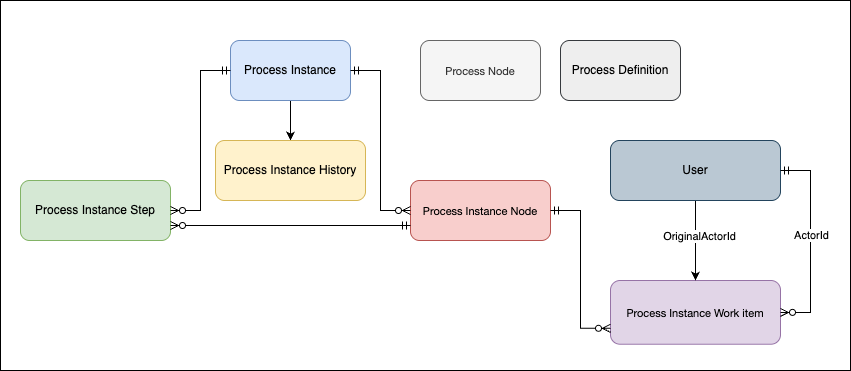
The Approval Process in Salesforce is an automated sequence of steps where a record is reviewed and approved (or rejected) by designated users based on predefined conditions. This ensures compliance, proper authorization, and consistency in business operations. Key Objects of an Approval Process 1. ProcessNode (Approval Step Definition) (04b) Defines the approval steps in a process. SELECT Id, Name, DeveloperName, ProcessDefinitionId, Description FROM ProcessNode 2. ProcessInstance (Approval Request) (04g) Created when a record is submitted for approval. Stores the current status and progress of the approval process for that record. Acts like a snapshot, tracking where the approval stands at any given moment. SELECT Id, ProcessDefinitionId, TargetObjectId, Status, CompletedDate, LastActorId FROM ProcessInstance 3. ProcessInstanceHistory Keeps a record of all actions (audit trails) taken on a specific approval process instance. Logs approvals, rejections, reassignments, and recall...
Salesforce Service Cloud Overview NOTE: Generally Service agents works on Service Console. Service Cloud focuses on customer support and case management. Salesforce Service Cloud is a customer service and support platform built on the Salesforce Customer Success Platform. Service Cloud enables service teams to manage cases, knowledge, and incidents collaboratively from a single AI-powered workspace. It supports omnichannel customer interactions across email, phone, chat, social media, and self-service portals. Key features include case management, knowledge management, service process automation, omnichannel routing, telephony integration, AI-powered recommendations, and service analytics. Objects used in Service Cloud Case: The key object for managing customer support issues or requests. It stores information about customer inquiries, complaints, or incidents. Account: Represents companies or organizations that customers belong to. Acts as a parent record for Contacts an...



Comments
Post a Comment